AI in customer service has evolved from simple automated responses to agents capable of understanding context and resolving complete requests, integrated with internal systems. More than responding, the focus now is on executing and completing end-to-end requests.
In this guide, you will understand the differences between chatbot, copilot, and AI agent, when to use each model, and how to implement and scale automation with a focus on real resolution, avoiding rework and improving operational efficiency.
AI in Customer Service Guide: from chatbots to AI agents in just a few weeks
The use of AI in customer service ranges from basic responses and triage to agents capable of carrying out tasks and resolving complete cases when integrated with internal systems. Real progress happens when you move from superficial automation to resolution at scale, with a direct impact on cost, capacity, and experience.
The problem is that many companies still use AI as an FAQ, even when the pressure is already different. With WhatsApp as the dominant channel in Brazil and volumes growing with no room to expand the team, automation stops being informational and is expected to actually solve tasks.
That’s why I put together this guide to organize the current AI landscape in customer service and help you understand what each model is, when it makes sense to use it, and how to scale without turning AI into yet another source of rework.
What is AI in customer service today?
AI in customer service is the use of language models and automation to answer questions, guide users, support human agents, or resolve cases autonomously. It can operate at different levels, varying according to the degree of autonomy, context, and integration with internal systems.
In general, AI in customer service today appears in three levels:
Decision-tree chatbots, used for menus, triage, and basic guidance.
Copilots, which support the human agent with suggestions, summaries, and information retrieval.
AI agents, which interact with the customer, understand the context, and execute complete workflows when integrated with systems.
These approaches are not direct competitors. They occupy different places within the operation and solve different problems. The most common mistake is to treat them as equivalent or expect the same type of result from all of them.
In scenarios where there are critical channels, such as WhatsApp, with high volume and an expectation of immediate response, the room for solutions that only guide users decreases. That is why understanding the role of each AI level stops being conceptual and begins to directly influence operational efficiency.
Also read: Decision-tree chatbot vs. AI agent: which is better for your operation?
What’s the difference between a decision-tree chatbot, a copilot, and an AI agent?
Tree-based chatbots follow fixed flows and work well for triage. Copilots increase the productivity of the human agent, but do not replace resolution. AI agents understand context, consult systems and execute tasks, taking on a significant part of end-to-end customer support.
To better understand, see the comparison table below:
Criterion | Tree-based bot | Copilot | AI Agent |
Objective | Triage/guidance | Help the human | Resolve cases |
Where it works | Front-end | Agent interface | Front + back office |
Understands context | No | Partial | Yes |
Executes tasks | No | No | Yes |
When to use | Simple cases | Overloaded team | High and recurring volume |
Tree-based chatbots work well for organizing the initial contact and handling simple and predictable requests. Copilots are recommended when the focus is on increasing the productivity of the human team, reducing effort, response time, and rework, but without eliminating support interactions.
AI agents make sense when there is recurrence, context, and a need for execution. They stand out by resolving complete workflows, not just guiding or suggesting answers.
Why does “resolve” matter more than “deflect”?
The deflection logic was created to ease queues: pushing part of the ticket volume to self-service, FAQs, or simple bots. This helps in the short term, especially during peaks, but it has a clear limit. When AI only guides, the customer still depends on the human team to complete what really matters.
Deflecting without resolving increases repeat contact and frustration. In customer support, the real gain comes when AI handles requests end to end, without transfers, rework, or repeat contact. This impacts cost, capacity, and experience in a more sustainable way than merely diverting tickets.
Deflection solves the number, not the problem
In practice, deflection usually shifts the effort rather than eliminating it. The contact comes back through another channel, at another time, or arrives more complex. The volume may even drop, but the cost per interaction rises, frustration increases, and the SLA turns into a game of passing the buck.
Resolving means identifying the demand, understanding the context, and carrying out what needs to be done: updating data, checking status, recording requests, triggering systems, confirming outcomes.
This is the point at which AI agents stand out. They do not just answer questions; they complete flows. And that is what creates real impact on operational capacity, predictability, and the customer’s perceived experience.
What needs to be in place before adding AI to customer support?
Before introducing AI into support, the operation needs organized data, clear workflows, integrated systems, and governance criteria. Without this, AI may respond, but it solves little, creates exceptions, and causes rework. The operational foundation defines the ceiling of results.
In most cases, AI does not fail because of technical limitations, but because of a lack of operational foundation. Without reliable content, consistent data, and clear rules, automation tends to over-guide, transfer too early, or get things wrong precisely in the most common cases.
Another critical point is the handoff. Defining when AI should escalate to a human is not a UX detail; it is a decision about cost, risk, and experience. A good handoff preserves context and prevents the customer from having to start over.
Before thinking about AI, it's worth checking whether the operation has the minimum structure in place:
knowledge base with clear policies.
mapped main contact reasons.
basic integration with help desk or CRM.
objective escalation rule.
test environment with real cases and exceptions.
Without these prerequisites, AI tends to perform below expectations and generate more rework than efficiency. That is why structuring things well before implementing AI in support is what will define your success.
Integrations: what changes when AI accesses the back office?
When integrated with the back office, AI starts consulting real data, executing actions, and resolving customer service requests. This is the difference that separates a “conversational FAQ” from an automation that actually resolves issues. Without access to internal systems, AI in customer service is limited to guiding and answering questions.
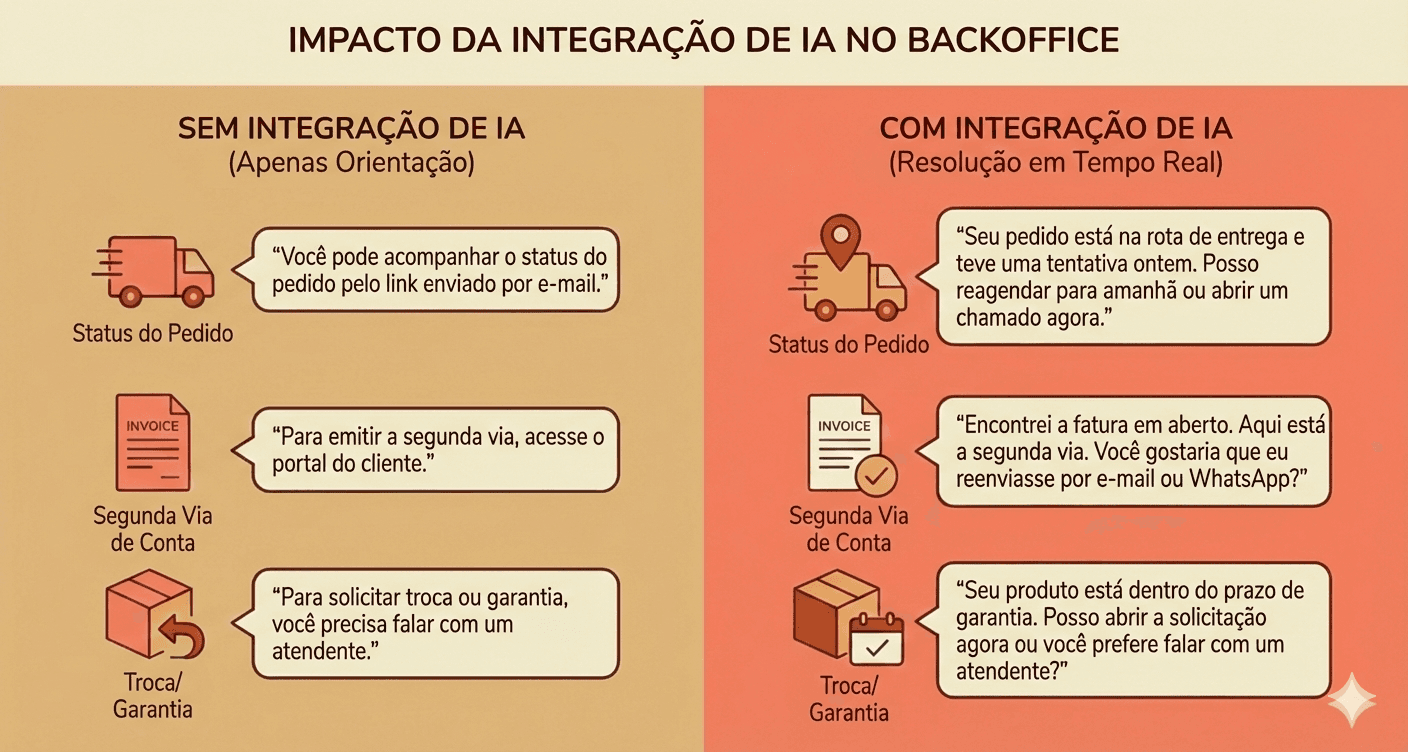
Practical example of what changes when AI accesses the back office
Based on the history we have, agents disconnected from the back office tend to resolve a limited share of contacts, often around ~30%, varying by segment. Beyond that, the customer inevitably gets handed off to a human.
The integrations that most unlock resolution are:
Help desk/CRM: history, tags, ticket creation and updates.
Orders and logistics: status, exceptions, delays, and deliveries.
Billing and payments: duplicate invoice, refund, confirmation.
Account and identity: plan, eligibility, customer data.
Official source: policies, deadlines, updated rules.
How to implement AI in customer service in weeks (from pilot to rollout)
Implementing AI in customer service does not require a long project. The safest path is to start small, with a few contact reasons and one priority channel, test with real data, adjust quickly, and only then scale. Well-defined pilots reduce risk and speed up learning.
In general, there are two paths: fast-track (accelerated implementation) and phased rollout (implementation in phases). The first speeds things up when there is urgency and a minimal foundation is already in place. The second makes more sense when operations are sensitive and risk needs to be controlled. Both work as long as the initial scope is clear.
Before scaling, it is worth creating a test environment with real conversations, including common everyday variations such as typos, incomplete messages, topic changes, and out-of-pattern cases.
Step by step for proper implementation
Map the top 10 contact reasons: prioritize volume and repetition, especially on WhatsApp.
Choose 3 quick wins for the pilot: frequent cases, with a clear process and low risk.
Define boundaries and handoff: when AI resolves it on its own and when it should escalate, without making the customer start over.
Test with real conversations: include errors, incomplete messages, and out-of-pattern cases.
Go live with continuous monitoring: quick adjustments in the first few days make all the difference.
The goal here is to validate quickly, fix early, and scale only after the implementation is truly working.
Which metrics show whether the AI is working?
The most important metrics for evaluating AI in customer support are the ones that indicate real resolution, not just speed. Resolution rate, involvement rate, and recontact show whether the AI is solving problems end to end, reducing the team’s effort, and preventing the customer from coming back for the same reason.
In day-to-day operations, the most common mistake is tracking only superficial metrics, such as response time or “deflected” volume. They may even improve at first, but they do not show whether the issue was actually resolved or merely pushed to another channel or to a human later on.
The metrics that matter most are:
Resolution rate: % of cases resolved by AI.
Involvement rate: % of conversations with AI involvement.
Automation rate: resolution × involvement (how much of the operation was actually automated).
Complementary CX metrics:
7-day recontact: did the customer come back for the same reason?
Time to resolution: did it go down, or did it just move elsewhere?
CSAT by contact reason: where the AI improves (or worsens) the experience.
Quality of the handoff: if there was an escalation, did the human receive enough context?
These indicators help avoid the trap of “pretty deflection.” A healthy AI is not the one that responds fastest, but the one that resolves more relevant cases, with less recontact and less human effort.
How to maintain and improve after go-live (without stagnating)
AI in customer support does not improve on its own after launch. Performance evolves with routine, review, and continuous adjustment. Without a clear owner, conversation analysis, and content updates, automation stagnates, loses coverage, and begins to generate more exceptions, rework, and operational risk over time.
After go-live, many operations switch to “auto mode.” The AI stays live, the numbers stop improving, and little by little the same problems reappear: outdated responses, increased fallback, and a loss of team trust.
Where things usually start going wrong:
There is no clear owner for the AI: no one decides what to adjust or prioritize.
Outdated knowledge base: policies change, but the AI keeps responding as before.
Lack of a weekly ritual: no one reviews failed conversations.
Absence of logs and analysis: errors repeat without diagnosis.
A good starting point to avoid this is to establish a simple weekly ritual, focused on learning from what didn’t work: conversations that fell into fallback, generated repeat contact, or required human intervention.
From this diagnosis, adjustments are made to the responses, policies, or flows involved, always validating that the handoff to the human continues to provide sufficient context; allowing the AI to evolve along with the operation, the product, and customer behavior.
See also
Frequently asked questions
Does AI in customer service replace the human team?
No. In practice, AI reduces repetitive volume and handles simple or standardized cases, while the human team focuses on exceptions, sensitive decisions, and higher-value interactions. The real gain is in capacity, not replacement.
How do I know if I need a chatbot, a copilot, or an AI agent?
The choice depends on the problem you want to solve. Chatbots work for triage and simple guidance. Copilots help human agents become more productive. AI agents make more sense when there is volume, exceptions, and a need to resolve interactions end to end.
Does AI in customer service work without integration with internal systems?
It works in a limited way. Without access to back-office systems, AI tends to be restricted to FAQs, guidance, and triage. Integrations with CRM, orders, billing, or account records are what make real resolution and consistent operational impact possible.
How long does it take to implement AI in customer service?
When properly scoped, the initial implementation can take a few weeks. Successful operations start with a small number of contact reasons, one priority channel, and a controlled pilot before scaling.
Which metrics indicate whether AI is working?
The main ones are resolution rate, AI engagement, and repeat contact. Metrics like response time help, but they do not show real impact if the problem is not resolved on the first contact.
When does it make more sense to buy a ready-made solution than to build in-house?
Buying usually makes more sense when there is a high volume of interactions, multiple integrations, operational risk, and a need for governance. Building in-house requires ongoing maintenance and a dedicated team, which does not always scale well.