Discover the best Zendesk alternatives in Brazil with a practical decision guide, including comparison criteria and the right questions to choose the best option.
If you are looking for alternatives to Zendesk, it's because some part of the operation has stopped scaling as it should. It may be rising costs, excessive dependence to make adjustments, or difficulty keeping up with the pace of your support, especially when WhatsApp begins to concentrate significant volume.
But switching platforms without clarity about the real need usually only shifts the problem. Therefore, before deciding, it is worth understanding whether the friction is in the tool's model, the total operating cost, or the way support has evolved over the last few months.
Below, we outline the scenarios in which Zendesk tends to work well, where other solutions are better, and how to compare alternatives with practical criteria, reducing the risk of leaving one complexity to enter another.
What is Zendesk and where does it work well?
Zendesk is a customer support platform structured around tickets. It organizes conversations into queues, distributes tasks, records complete history, and allows you to create routing, prioritization, and tracking rules. In operations that need control and predictability, this structure brings clarity to the team.
It tends to work well in process-driven environments. Teams that work with defined SLAs, standardized categories, clear responsibilities, and a need for auditing can get more value from the tool. The ticket logic helps maintain traceability, organized history, and management visibility.
The table below summarizes in which scenarios it usually delivers the best performance and what needs to exist for that to happen.
Scenario | When Zendesk tends to work well | What you need to have for it to work |
Ticket-oriented operation | Recurring requests, SLAs, categorization, triage | Defined processes and disciplined use |
Governance and traceability | Auditing, history, rules, access controls | Tool owner (ops/admin) and maintenance routine |
Multichannel “process-oriented” | Different channels, but with the same control model | Standardized support and knowledge base |
Data maturity | Consistent use of tags, reasons, reports, QA | Ability to configure, measure, and continuously adjust |
When is Zendesk not the best option for operations in Brazil and LatAm?
In Brazil and Latin America, the difficulties with Zendesk rarely appear at the beginning of the contract. They arise in ongoing use, where the sensitive point is usually the total cost of operating and evolving the tool, when the company needs to add extra layers, specialized services, or external support to make frequent adjustments.
As the operation grows, the need to change workflows, create automations, review reports, and adapt processes also increases. When each adjustment depends on a complex configuration or specialized support, the tool's pace starts to fall behind the pace of the business.
For operations with seasonal peaks, intense campaigns, and high volume in messaging channels, this difference weighs on day-to-day work. The most recurring pain points usually concentrate on four fronts:
Financial predictability, especially when basic plans require add-ons to meet the reality of the operation.
Dependence on support or services, which slows down changes that should be handled internally.
Complexity in evolving processes, where simple adjustments turn into an internal project queue.
Fit for conversational channels, especially when WhatsApp and quick messages become the center of service.
The table below organizes these frictions in practice and shows how they directly impact CX day to day.
Pain | How it appears in practice | What this becomes in the CX Head's day to day |
Dollar billing and “layers” | The base plan seems okay, but extras come in to close gaps | Budget becomes recurring negotiation, hard to predict |
Support and service dependency | Progress depends on external help or someone highly specialized | CX roadmap moves more slowly than it should |
Complexity in evolving | Simple adjustments turn into internal queues, projects, or rework | The team “serves the tool” instead of serving the customer |
Messaging channels and real routine | The critical channel demands fluidity, speed, and consistency | You create stack parallel to cover what is missing |
If adapting service to what changes every month depends on external help or turning it into a big project, the operation slows down. And when costs grow faster than the efficiency delivered, the discussion stops being a matter of tool preference and becomes strategic.
What are the main alternatives to Zendesk for companies in Brazil?
When looking for alternatives to Zendesk in Brazil, you find options that range from traditional help desks, conversational platforms, and product-oriented solutions. Therefore, the decision needs to consider not only the features offered, but also how the tool fits the reality of your operation.
Below, we have organized the main alternatives used by Brazilian companies today, highlighting where each one tends to work best and in which scenarios it can create friction. The idea is to help you compare clearly, taking into account the type of operation you run today and the pace of change you need to sustain.
Cloud Chat
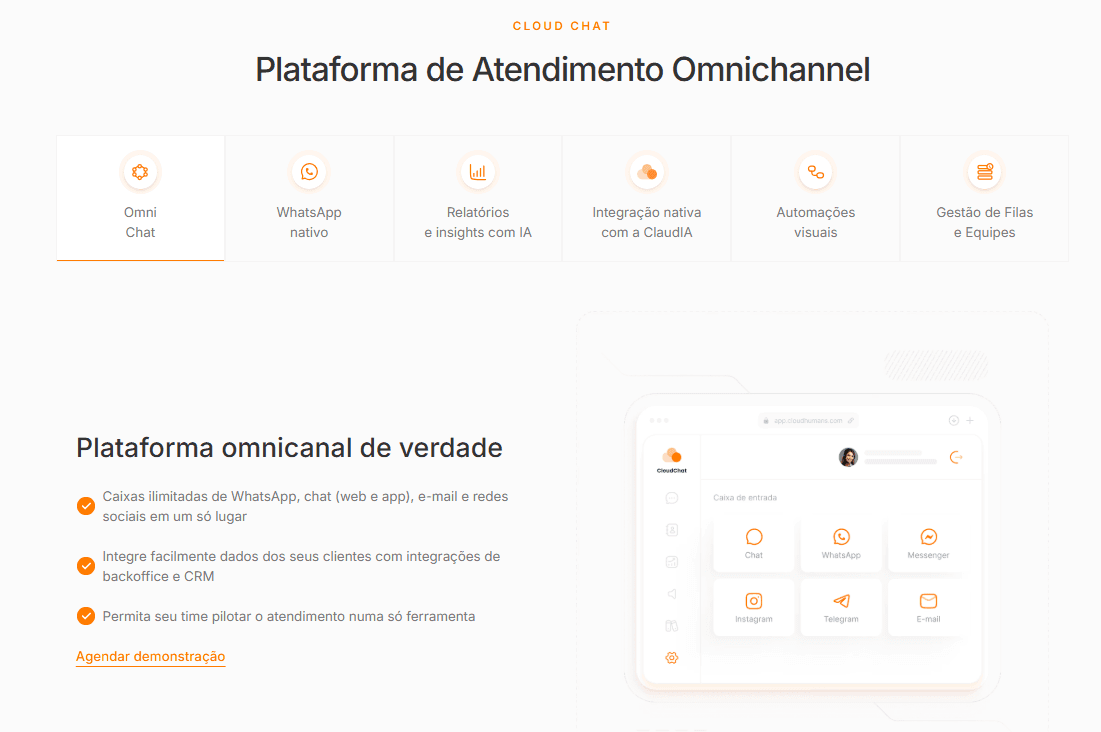
Cloud Chat is often a great alternative when the main challenge is WhatsApp and the difficulty of scaling the operation with agility. The platform was designed for conversational operations with a native AI agent acting as Level 1, automating from the start of the flow and reducing the burden on the human team by up to 80%.
Instead of treating WhatsApp as just another channel inside a ticket-oriented structure, Cloud Chat organizes support around the conversation. AI operates at the first level, resolves recurring requests, and routes only what requires human intervention, already with full context.
Humans and AI work in the same structure, without parallel layers or improvised integrations. This reduces technical adjustments, simplifies automation tests, and avoids hiring additional tools just to handle AI and messaging.
Some points that weigh in the direct comparison with Zendesk:
WhatsApp-first structure: suitable for operations where the channel is dominant (it does not become an “adaptation”).
AI-first: automation enters as part of the process, not as a plugin.
Support in Brazil, including via Slack: you get up and running quickly without depending on consulting.
Pricing model in reais and per license for the person who handles support: costs become more predictable and aligned with usage.
In operations with high support volume across messaging channels, these factors tend to affect cost and the speed of evolution. The ability to integrate with ERP, OMS, logistics, payments, and help desk allows end-to-end request resolution, which reduces rework and dependence on manual flows.
For whom it is a fit (fit): companies that want to bring AI into support and prioritize operational simplicity, integration, and cost control.
When it does not make sense (anti-fit): it may not be the best choice if your priority is ultra-rigid governance and extremely specific customizations that require a more “enterprise” and heavier model. For scenarios where the company has more than 5,000 employees.
Intercom
Intercom often appears in the comparison when the priority is an in-product chat experience, especially in SaaS or operations with a strong in-app presence. It combines support, automation, and communication within the user's own environment, which can elevate the digital experience in specific contexts.
In Brazil, the discussion usually has less to do with functionality and more with the operating model. Billing in dollars and expansion through modules can make costs less predictable, especially in growth scenarios. In addition, support tends to follow a global standard, with less local proximity and less flexibility in day-to-day operations.
The table below helps visualize more clearly when Intercom can or cannot work for your operation.
Factor | When Intercom is a good fit | When it becomes a problem (vs. other alternatives) |
Price | You have budget for a global tool and exchange-rate variation | USD pricing and expansion make the bill unpredictable |
Support/customer service | You do not depend on close day-to-day support | You need to get unstuck quickly with support in Portuguese and more hands-on help |
Simplicity | Your team adapts well to the Intercom way of operating | You want autonomy and frequent changes without friction |
For whom it is a fit (fit): for companies with an international budget, distributed operations, and a focus on digital products, Intercom can make sense as a consolidated platform.
When it does not make sense (anti-fit): for teams that seek frequent autonomy, quick adjustments, and financial predictability in reais, the adaptation may require more internal structure than expected.
Movidesk
Movidesk often makes sense when you want a help desk with more complete support functionality, competitive pricing in reais (R$), and a more direct path to organizing the operation without moving to a global suite, which can become expensive and heavy. On the other hand, it tends to frustrate those who want a more messages-first experience as the standard operation.
For whom it is a fit (fit): teams that want to structure support with processes, queues, and controls, seeking costs in reais and a viable adoption curve.
When it does not make sense (anti-fit): operations where messaging channels are the heart of the experience and you need that to be native and very fluid, or when you want automation/AI as the absolute priority from day one.
Octadesk
Octadesk tends to fit well when you want a help desk in reais (R$) focused on organizing support and bringing efficiency, and you accept that adaptation to messaging channels can be “average.” It is a common alternative for those who want to leave the cost/complexity of global suites without giving up a more structured support base.
For whom it is a fit (fit): teams that want to strengthen support operations with flows and organization, seeking predictability in reais and a solution with more of a “helpdesk” base.
When it does not make sense (anti-fit): those who need messaging channels to be the main experience, with fluency and operational depth, and those who want AI/automation as the product's core.
Blip
Blip is usually a good choice when automation in messaging channels is a priority and it can be very strong at that. The key point is to understand that, in many scenarios, Blip works better as a specialized layer (messages + automation) than as a complete replacement for a traditional help desk , especially if you need more robust classic support functionality.
For whom it is a fit (fit): operations that want to put automation and conversations in messaging channels at the center, and that accept building a stack where Blip is a strategic piece.
When it does not make sense (anti-fit): those who want “a single platform” that already comes with everything for support, governance, and management in the same package, without building an ecosystem around it.
Are global alternatives to Zendesk worth it for companies in Brazil?
Some global alternatives may be worth it, but almost always for “enterprise” reasons: compliance, ecosystem, international standardization, or very specific governance requirements. For most teams in Brazil, the risk is not a lack of feature; it is moving onto yet another platform with USD costs, distant support, and a model that requires specialists to operate day to day.
The right question is not “which is the best in the world?”. It is “what do I gain from a global solution that I can’t get with a local alternative?” and, moreover, whether that gain pays for the extra cost and operational friction.
How to decide without getting lost in “brands”:
If your main reason for leaving Zendesk is unpredictable cost + complexity + distant support, a global alternative tends to repeat the pattern (under a different name).
If your reason is international standardization + heavy governance, then it does make sense to put globals on the shortlist, but with an honest assessment of total cost and dependencies.
Two questions to cut the shortlist in half:
“Do I need this global tool because of a requirement (business/compliance/standardization) or because of preference?”
“Do I have the structure to operate this without becoming hostage to consultants and without stalling evolution?”
How can you migrate from Zendesk with less risk and more predictability?
The safest migration is not the one that “changes everything at once.” It is the one that reduces operational risk. In other words, it keeps support running, proves value quickly, and prevents you from becoming hostage to a long project.
In practice, the best path is usually to leave Zendesk in stages, starting with what creates immediate impact (and is easier to validate) and saving the “bulk” for when the new flow is already stable.
Here is a simple roadmap for you to handle the switch as a process, not an event:
Stage | Objective | Expected result |
1) Define the why and the criterion | Choose the main axis (cost, speed, quality, channels, AI) | A short shortlist that makes sense for your scenario |
2) Pilot with real flows | Test 3–5 common requests + exceptions | Proof that the operation works outside the ideal scenario |
3) Start with a “slice” of the volume | Migrate one channel, queue, or request type | Stability without freezing the team and without hurting SLA |
4) Expand with minimal governance | Create routines for adjustment, QA, and improvement | Continuous evolution without depending on consulting for everything |
5) Migrate history and consolidate | Bring over what is necessary and retire the legacy calmly | Clean closure, without losing important traceability |
What many people get wrong (and how to avoid it)
Mistake: trying to replicate 100% of Zendesk in the new system before putting it into production.
How to avoid: migrate what matters for support to work and evolve. You can decide the rest later with data.
Mistake: running a “pretty” pilot with an ideal flow and no exceptions.
How to avoid: test annoying cases like refunds, fraud, delays, exchanges, payment failures, incomplete data. That is where the tool proves itself.
Mistake: not defining an owner and a cadence for improvement.
How to avoid: choose a responsible person and a short weekly cadence to adjust what the operation reveals.
Two signs that you are migrating the right way:
You can put part of the volume into production without chaos.
You can improve something every week without depending on a project.
What questions should you ask in a product demo to make a confident decision?
The best demo is not the one that shows “more things.” It’s the one that simulates your real support, with exceptions, spikes, and handoff to a human, and makes the total cost and day-to-day support clear. If you leave the demo with objective answers to the questions below, you drastically reduce the risk of switching platforms and repeating the same problems.
Topic | Deciding question | What would be a good sign |
Total cost | “What’s included in the price and what usually becomes extra as I grow?” | The bill is understandable, predictable, and aligned with the people actually handling support |
Exchange rate | “How much of my cost is in USD and how does that scale?” | You know where the fluctuation affects you and can plan for it |
Support | “What is support like day to day: channel, language, and response time?” | You can get unstuck quickly, with responsiveness and predictability |
Real operation | “Shall we simulate 3 real flows now?” | The tool handles exceptions, not just the perfect scenario |
Autonomy | “What can my team change on its own in minutes?” | Common changes don’t turn into a project or a specialist queue |
AI/automation | “What does AI solve, and how does a human take over when it doesn’t?” | Handoff with context, control, and less rework |
Multichannel | “What changes in the operation when the channel changes?” | The experience is consistent, without channel-by-channel patches |
Implementation | “What needs to be ready to go live, and how long does it take?” | Go-live is feasible and evolution doesn’t depend on constant consulting |
How to choose without regrets
If you’ve made it this far, it’s already clear that moving away from Zendesk is rarely about “finding a better tool.” It’s about recovering predictability, autonomy, and speed, without becoming hostage to consultants, complexity, and costs that grow beyond your control.
The safest way to make the decision is simple. Choose 2–3 options and compare them by what happens after the go-live (total cost, day-to-day support, and ease of evolution).
This is where Cloud Chat often stands out for companies in Brazil, because it gets ahead when you:
want a WhatsApp-first platform that treats the messaging channel as an operational priority, not an adaptation;
want an AI-first layer to automate level 1 support with control and decent handoff to the team;
value close support (Brazil, including via Slack) to unblock things quickly without “opening a ticket and waiting”;
need pricing in reais (R$) and a model more aligned with operations, charging licenses only for those who handle support (without penalizing coordination and management).
If your search for “Zendesk alternatives” started because of unpredictable costs, difficulty evolving, and the feeling of always “paying tolls” to operate, it’s worth putting Cloud Chat as the first option on the list.
Click here and schedule a demo.
See also
If you're evaluating Zendesk, also see the direct comparison and the real costs: