An AI agent for WhatsApp is a system that talks to the customer, understands the context of the request, and performs real actions by integrating with internal systems such as orders, billing, and support. Unlike traditional bots, it doesn’t just respond; it resolves requests end-to-end.
If you are considering using it in your operation, it’s worth reviewing throughout this text the practical differences between bots, copilots, and AI agents, how an agent operates end-to-end on WhatsApp, why integrations are the real bottleneck of automation, and which metrics you should actually pay attention to.
Decision tree bot vs copilot vs AI agent
How an AI agent works on WhatsApp
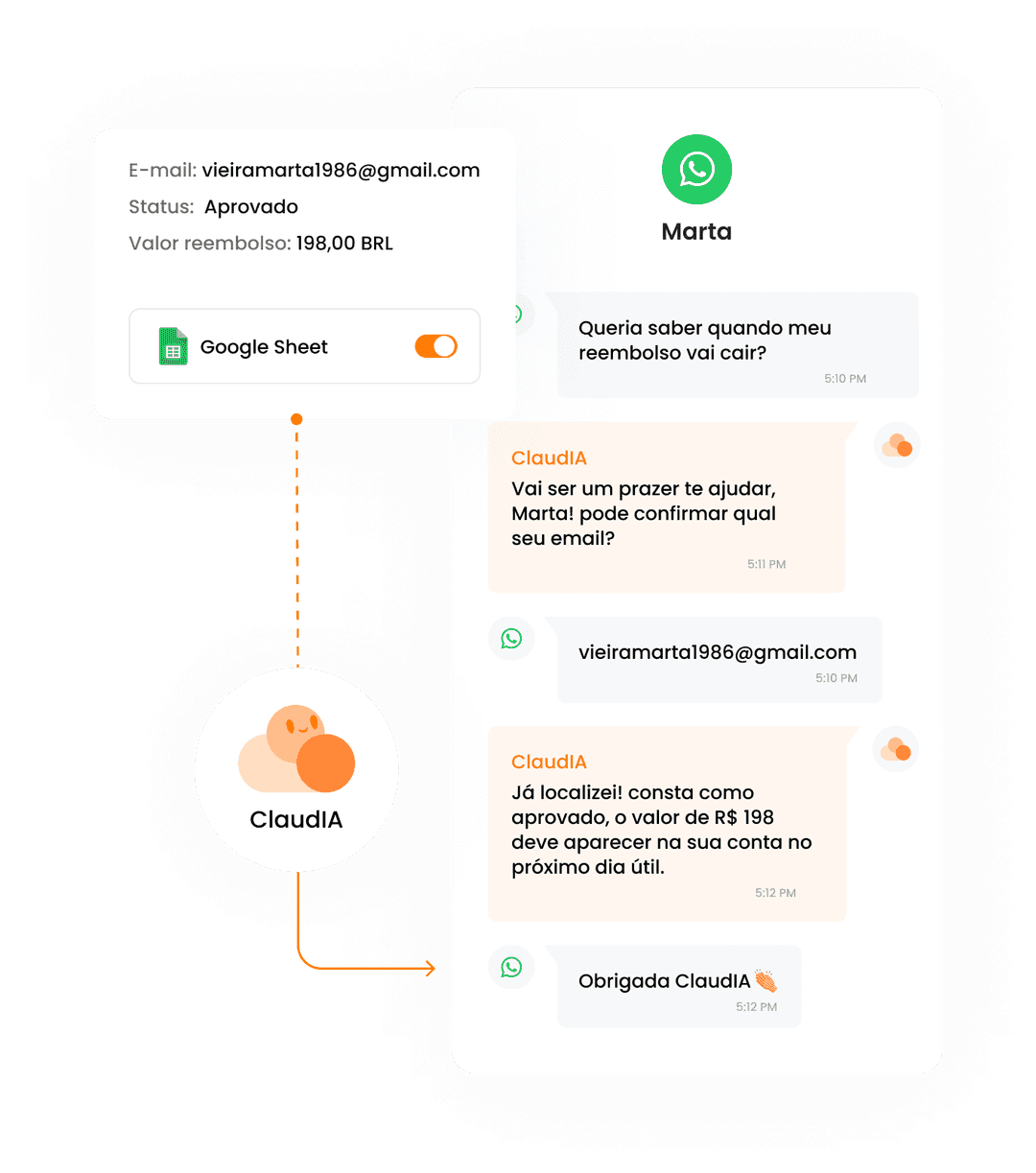
An AI agent on WhatsApp acts as a non-linear decision-making flow, oriented towards resolution. It can operate end-to-end in customer service, as we exemplify in the step-by-step process below.
1) Identifies the intention and collects the minimum context: who is the customer, what is the request, what is the urgency.
2) Asks short questions (minimum friction), such as asking for the order number or confirming whether the issue is delivery or billing.
3) Consults reliable sources, which can be the knowledge base for policies, the ERP for order status, the gateway for payment, or the help desk for history. Without this step, the automation remains superficial.
4) With the data in hand, the agent executes the allowed action: generates a duplicate invoice, sends tracking information, opens a request for exchange, updates registration, or logs an occurrence. Then, it confirms if it was successful.
5) When the case deviates from the standard, the handoff (direction to a human attendant) occurs, where a summary of what the customer wants, collected data, and what has already been attempted is sent. This avoids the classic "tell me everything again".
Want to see how it works in practice? Try it out now with ClaudIA.
Integrations: the game changer
On WhatsApp, the customer does not only want information; they want the full progress. Without access to the back office, the AI can converse well, but resolves little. It is limited to explaining policies, requesting data, and opening tickets.
According to some analyses of our database, when the AI does not access internal systems, only about 30% of the service requests are resolved. This number varies by segment, maturity, and other aspects, but the pattern repeats: without integration, effectiveness is lower.
Some integrations that help change this scenario are:
Orders and logistics: status, tracking, exceptions.
Billing and payments: second copies, failures, refunds.
Help desk and CRM: history, ticket creation, and classification.
Registration and eligibility: limits, plans, policies.
When these integrations are connected, the AI stops being an initial filter and starts to act as a full-fledged resolution agent. This is what raises the resolution rate, reduces follow-up contacts, and changes the customer's perception of this channel.
Metrics that matter most for CX
When AI enters customer service, focusing only on speed or diverted volume usually leads to wrong decisions. For CX leaders, the right metrics are the ones that show whether the customer's problem was resolved, whether the experience improved, and whether the operation gained predictability.
Here, the main metrics to track are:
Resolution rate: how many services the AI completes end-to-end, without follow-up or human intervention.
Follow-up within 7 days: indicates whether automation solved or just pushed the problem aside.
Time to resolution: how long it takes for the customer to resolve the issue, not just to receive the first response.
CSAT by reason for contact: reveals where the AI truly helps and where it generates friction.
Quality of the handoff: measures whether the context reaches the human attendant completely, avoiding rework and repetition.
Official and updated knowledge base.
When these metrics evolve together, AI stops being an experiment and becomes a reliable part of the operation. If only speed improves, the risk is high for silent frustration, follow-up, and team burnout.
Pain-free implementation: two-week pilot
Implementing an AI agent on WhatsApp does not require a complete rollout from day one. The safest path is to quickly validate with a well-structured pilot, using real data, learning from mistakes, and only then scaling up.
The initial step is to map the top 10 reasons for contact on WhatsApp, prioritizing volume and repetition. From there, select three flows of quick win, meaning frequent cases with a clear process and low risk of exceptions. These flows are sufficient to test real resolution without exposing the operation.
Before going live, it is essential to define clear guardrails: what the AI can execute alone, what it should never decide automatically, and when to escalate to a human. Finally, it is necessary to review failed conversations, adjust questions, update policies, and refine integrations.
Companies that want to accelerate this implementation can rely on ready-made solutions, such as ClaudIA. It was specifically designed for WhatsApp-first operations that require real resolution, with integrations to the back office, clear guardrails, contextual handoff, and a continuous improvement routine.
Frequently Asked Questions
What is an AI agent for WhatsApp?
An AI agent for WhatsApp is an intelligent system that processes natural language to converse with customers, understand intentions, and when integrated with internal systems, perform automated tasks in customer service.
Can an AI agent replace a human attendant?
No, not completely. Even when AI autonomously resolves many cases, human attendants remain necessary for complex demands, exceptions, and sensitive situations that require human judgment or empathy.
What is the difference between an AI agent and a traditional chatbot?
Traditional chatbots respond with pre-programmed content, while AI agents understand natural language, adapt responses to context, and when connected to systems, can perform complete actions instead of just providing guidance.
Is it difficult to train or set up an AI agent?
It depends on the solution and the database you provide. Some platforms only require the upload of documents (such as PDFs or URLs) to train the AI, while deeper integrations with internal systems demand technical configuration.
In which cases does an AI agent on WhatsApp really help?
AI agents work well for more complex questions, status inquiries, processing duplicate bills, and other repetitive tasks that would normally take time from the customer service team.
Do AI agents work 24 hours a day?
Yes. One of the advantages is providing continuous service, automatically responding outside of business hours and during peak times, increasing availability and response speed.
How does AI handle complex or ambiguous questions?When AI cannot clearly identify what the customer wants or when the case requires context that cannot be automated, a good agent escalates to a human attendant, passing along context, history, and data already collected.